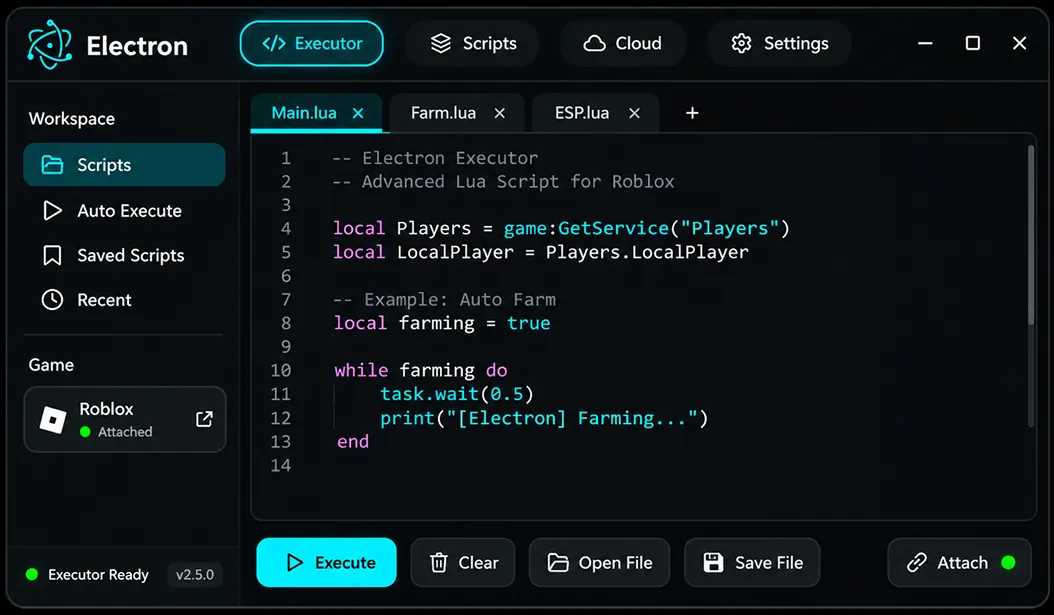
Updated to 4.2.1 and the tabs alone justify it. Kept three different farming scripts open all evening without losing any undo history.
This is the official home of Electron Executor, a Roblox script executor built around a complete Luau runtime and a single attach button. Grab the Electron Executor build for your system, point it at the Roblox client, and your scripts run in the next few seconds.
Runs with the Roblox desktop app — the electron executor install takes about a minute.
When Roblox pushes a client update, attach can stop working for a few hours until a rebuilt Electron Executor goes out. This status line is the first thing we change on the Electron Executor site, so check it here before reinstalling anything.
Most executors look the same from the outside, so here is what actually sits under the window of Electron Executor: the runtime it exposes to your scripts, the way it hooks into the game client, and the tools that come with it.
Inside Electron Executor you get metatable access, the debug library, upvalue reads, closures and a working loadstring. Scripts written for any modern runtime drop straight in.
Electron Executor finds the running client on its own. Press Attach, watch the console line turn cyan, and the editor is live — usually under two seconds.
Roblox ships client updates on its own schedule, and every one of them can break injection. A patched build of Electron Executor normally lands the same day, and the status line on this page says whether the current one is live.
Type a game name and Electron Executor pulls matching scripts, each one checked against the current build before it shows up. Loading one is a double-click — no forum hunting, no pasting links from a stranger's video description.
Electron Executor reads bytecode back into readable Luau, save a place file, and watch every call in the log view. Useful when a script misbehaves and you need to see why.
Electron Executor holds one process and around 40 MB of memory while idle, nothing left running after you close it. Frame rates stay where they were.
Windows gets every Electron Executor feature first and the other builds trail it by a release or two. Rather than claim full parity, here is the honest grid of what each Electron Executor build can do today.
| Capability | Windows | Mac | Android | iOS |
|---|---|---|---|---|
| Script execution | ||||
| Script library panel | ~ | |||
| Multi-tab editor | ~ | − | ||
| Decompiler | − | − | ||
| Place dump & assets | ~ | − | − | |
| Floating overlay | − | − | ||
| Silent auto-update | ~ | − | ||
| Session key needed | Sometimes | Sometimes | Sometimes | Sometimes |
| Install route | .exe | .dmg | .apk | sideload |
The desktop builds of Electron Executor are where the developer tools live; phones trade those for the overlay. The electron roblox flow is identical everywhere though — open the client, attach, execute. iOS stays the most limited of the four because every install has to be re-signed, so treat it as the lightweight option rather than the full thing.
Pick the system you play on. The five stages below are the whole electron executor install — no account to create, no survey, no waiting room. Windows is the main platform for Electron Executor; the other builds follow the same flow with a couple of extra permissions.
Use the bar at the end of this section. You get a single 18 MB Electron Executor installer signed with the current build number, straight from electronexe.com.
Anything that writes into another process looks hostile to an antivirus, so Defender quarantines the file before it unpacks. Add the download folder to Exclusions first, then unpack.
The injector links against the Visual C++ 2015–2022 x64 redistributable. Most machines already have it; if the window closes on launch with no message, this is almost always the reason.
The browser player cannot be hooked. Launch the Roblox app, join a game, and wait until the world has finished loading before you switch windows.
Open Electron Executor, press Attach, wait for the confirmation line in the console, paste your code into the editor and hit Execute. From here on, launching is a two-click routine.
One disk image covers both Apple Silicon and Intel machines, so there is nothing to choose between.
Open the image and drag Electron Executor across. Running it from the mounted volume works once and then breaks on the next reboot, so move it properly.
The first launch is refused because the bundle is not notarised. Open System Settings, go to Privacy & Security, scroll to the blocked item and choose Open Anyway.
Start the Roblox client from your Applications folder and join a server. Keep both windows open side by side; the hook reads the running process, not the launcher.
The Mac build of Electron Executor lives in the menu bar. Click the icon, choose Attach, then write or paste your script in the editor window and execute.
Tap the bar below and the 14 MB Electron Executor package lands in your Downloads. Only take it from this domain — reposted copies of the file are where most bad builds come from.
Android only allows installs from the Play Store until you say otherwise. In Settings, find Install unknown apps and switch it on for the browser you downloaded with.
Install, open once, and allow Display over other apps. Without that permission the control panel cannot float above the game and nothing will appear in play.
Open Roblox on the phone and enter a server, then swipe back without closing it. The panel needs the game live in the background.
Drag the bubble anywhere on screen, open it, paste your script and tap Execute. You never have to leave the game to start or stop one.
Apple allows no direct installs, so you need AltStore or Sideloadly on a computer first. Both are free and take a few minutes to pair with the phone.
Download the archive to the computer, not the phone. The sideloader reads it from there and signs it with your own Apple ID.
Plug the phone in, point the sideloader at the archive and start the install. Free Apple IDs expire after seven days, so keep the tool handy for a re-sign.
On the phone open Settings, General, then VPN & Device Management, pick the developer profile and tap Trust. Until you do, the icon is there but refuses to open.
Join a server in Roblox, switch to Electron Executor, attach, then run your script from the same editor you would see on a desktop.
Nothing here is demanding. If the machine already runs Electron Roblox sessions at a playable frame rate, it has room for the executor as well.
One thing worth repeating: Electron Executor works with the standalone client only, on every platform. The browser player has no process to write into.
Read The StepsSome Electron Executor builds ask for a session key on the first attach of the day. It is issued on this page in one step — press the button, copy the string, paste it into the prompt. No shortener chain, no countdown page, no third-party host in between.
A key stays valid for twelve hours from the moment it is issued. When the clock runs out, come back and press the button again.
Each string is tied to the device that asked for it, so a key copied into a group chat will not open anything for anyone else.
Nothing redirects you through ad hosts or fake verification pages. The string is generated here and shown here.
Then Electron Executor itself is the only thing left. Grab it and paste the string when the prompt appears.
DownloadThese are the entries pinned in the side panel of Electron Executor, each one re-checked against the current build. Open the panel in Electron Executor, pick a game, and the code loads into the editor — nothing to copy by hand.
Level farm with sea selection, quest chaining and a stop condition so it parks instead of dying at a boss.
Plant, water and harvest on a loop, with shop restocking and a seed priority list you set once.
Cast and reel handling that reads the minigame instead of guessing the timing, plus rod and bait switching.
Base runner with a value filter, so it only goes for targets above the threshold you pick and retreats on cooldown.
Movement helpers and a tracker overlay. Combat features are split out so you can load the quiet half on its own.
Resource gathering on a route, campfire upkeep and a night-time safe mode that stops the loop before it gets you killed.
Role reveal and coin collection, with a toggle to keep the overlay off other players' screens.
The command set most people start with: fly, noclip, waypoints, player list. Works anywhere Electron Executor attaches, no per-game version needed.
No entry under that name yet. The panel inside Electron Executor carries more than this page shows, so search there too.
A script can still break on its own when the game it targets changes. Dates above are the last time each one ran clean on a current Electron Executor build — anything older than two weeks is worth a second look in the log view.
Most people land here after trying something else, so here is where Electron Executor sits next to the other names that come up. Forums call all of them an electron exploit or an injector; the job is the same, the tooling around it is not. Where a rival does something better, it says so.
| Electron | Krnl | JJSploit | Wave | |
|---|---|---|---|---|
| Desktop | Windows, Mac | Windows | Windows | Windows |
| Mobile | Android, iOS | — | Android, iOS | Android, iOS |
| Price | Free | Free | Free | Free tier |
| Key system | On site, 1 step | Multi-checkpoint | None | Required |
| Script library built in | − | − | ||
| Decompiler | ~ | − | ~ | |
| Patch cadence | Same day | Weekly notes | Auto-update | Varies |
| Best at | Tooling depth | Stability | Zero setup | Mobile reach |
You want the library, the decompiler and place dumps in one window, and you are on Windows or a Mac.
You refuse to touch a key prompt at all. A no-key tool wins there, even though it gives up the extra tooling.
Every tool in this table, Electron Executor included, carries the same account risk. None of them is ban-proof, whatever the marketing says.
Ratings and comments from people running Electron Executor right now. The score below is the full aggregate across the current and the previous stable build.
622 ratings on Electron Executor v4.2.1
Updated to 4.2.1 and the tabs alone justify it. Kept three different farming scripts open all evening without losing any undo history.
Patch after the October client update was on the site in under a day. Decompiler is still slow on big hubs, but that one has been noted for the next release.
Notes about Electron Executor left in the Discord and on the feedback form, unedited apart from trimming. Praise and complaints both stay up.
Electron Executor attached on the first try, which honestly surprised me after the week I had with other tools. Console tells you exactly what stage it is on.
The library saves me a lot of tab juggling. Would like filters by update date though, some entries are clearly older than others.
I mostly use the decompiler. Being able to read a place back and see how an obfuscated hub actually works is worth the install on its own.
Client update broke everything on a Friday and the fixed build was out before the weekend ended. That turnaround is the whole reason I stayed with Electron Executor.
Runs fine on my laptop with the game on medium settings. The overlay on Android is a bit cramped on a small screen, but it does work.
Long farming scripts ran overnight without the editor falling over. Memory sat flat the whole session, which was never the case for me before.
Electron Executor is the first script tool I ever touched. The step about the C++ runtime is the part nobody else mentions and it was exactly my problem.
Key takes two seconds here instead of five ad pages somewhere else. Small thing, but it is the part I used to hate most.
Every public release of Electron Executor with what was added, what changed under the hood, what got fixed and what we took out. Dropped features are listed too — a changelog that only ever grows is a marketing page, not a record.
Mostly an editor release. Tabs had been the top Electron Executor request since the library moved into a side panel, and the attach path picked up a retry so one missed handshake stops looking like a dead build.
Editor tabs — up to eight scripts open at once, each keeping its own undo history and cursor position. Tabs survive a detach and reattach.
Live library search that matches game names as you type instead of waiting for Enter, with results ordered by when each entry last ran clean.
Session restore — the scripts you had open when the app was last closed come back on the next launch.
Attach makes a second attempt on its own after a short pause before it reports failure, and the console says which attempt went through.
Every library entry carries its last-checked date in the list, so stale scripts are obvious before you load one.
Log view keeps 2000 lines instead of 500 — long farming runs no longer scroll their own start out of history.
Editor came back blank when a laptop woke from sleep mid-session. The renderer now reattaches to its buffer instead of dropping it.
Library panel could open at zero width on displays under 1280 px wide.
Copying out of the log view pulled the line numbers along with the text.
The legacy console pane left over from the 3.x Electron Executor layout. Everything it did lives in the log view now.
Nothing to reinstall. Open Electron Executor and the updater pulls 4.2.1 on launch; saved scripts, profiles and an active session key all carry over.
The release that reshaped the Electron Executor window. The script library moved out of a modal and into a permanent side panel, and the Mac build was redrawn so both desktop versions finally match.
Library side panel with per-game folders, pinned favourites and a collapse toggle that stops it polling while closed.
Autocomplete for the services, instances and globals you actually use, built from your own editor history rather than a fixed word list.
Per-script notes — a line of your own text stored beside each saved file, so you remember what a script was for a month later.
Mac window rebuilt on the Windows layout. The menu-bar icon stays for attach and quick execute.
Editor moved to a fixed-width grid so indentation lines up with code pasted from anywhere else.
Library content is fetched when the panel opens, not at launch, taking roughly a second off cold start.
Line numbers drifted out of sync with the text on files past roughly 3000 lines.
Android overlay forgot its position after a screen rotation.
Attach stayed greyed out when the game client had been started before the app.
Mobile Electron Executor builds still shipped the old modal library in this version. The side panel reached Android in 4.2.1.
An emergency rebuild. The October 1 client update moved the offsets the hook relied on and attach stopped working in every Electron Executor install within hours. The memory work that had been sitting in testing went out in the same build.
Offsets are discovered at runtime rather than compiled in. The next client shuffle of this kind should cost hours instead of a full release.
Memory held across a long session dropped by about a quarter: execution buffers are released when a script finishes instead of being pooled for reuse.
Attach failed with a generic error after the October 1 client update — the reason this build exists.
Session key prompt came back after a reconnect even while the key was still inside its window.
Decompiler hung on places with very deep model trees instead of reporting the depth limit.
Update before anything else. 4.1.2 cannot attach to any current client, and no session key will change that.
An Electron Executor release aimed at people who read games rather than farm them. Place dumps became usable as real projects, and the Android overlay stopped being a fixed square you had to play around.
Assets in place dumps — meshes and textures are saved next to the model tree, so an exported place opens looking like the place instead of a grey skeleton.
Overlay resize and lock on Android. Size the panel once, lock it, and a mistouch mid-game cannot drag it across the screen.
Find in file inside the editor, with find-next, for the long hub scripts nobody wants to scroll by hand.
Decompiler output arrives formatted and indented. Before this you reindented everything by hand before it was readable.
Dump progress shows a running file count rather than an unlabelled spinner, so a large place no longer looks frozen.
Overlay never appeared on some MIUI and ColorOS builds until the vendor permission was granted a second time; the app now checks for it and says so.
Large dumps wrote a truncated file when the target folder sat on a different drive from the install.
Decompiled output from heavily obfuscated hubs still loses variable names. Recovering them is on the list, not in this build.
The rewrite. The 3.x core had been patched around one client change after another until keeping it alive cost more than replacing it. This build shipped a new injection core, the first native Mac client and session keys issued on our own site instead of through outside hosts.
Injection core written from scratch for the current client, roughly three times quicker to attach than 3.9.x and far less fragile when the client shifts.
Native Mac client as a universal binary covering Apple Silicon and Intel, with no emulation layer in between.
Session keys on electronexe.com in a single step, replacing the shortener chain the 3.x builds sent people through.
Log view with per-call filtering, which is what makes a failing script traceable instead of a guess.
Settings rebuilt around profiles, so a farming setup and a debugging setup live side by side instead of overwriting each other.
The Electron Executor installer dropped from 31 MB to 18 MB once the old renderer came out.
Windows 8.1 support. The new core relies on APIs that are not present there, and shimming them was not worth the surface area.
The 3.x key format. Old keys are not accepted and cannot be migrated — issue a new one on the site.
This was a clean install, not an update. Scripts saved in the old folder stay on disk and open fine from the editor, but settings and keys do not carry across.
The last patch on the 3.x Electron Executor core, published three weeks before the rewrite replaced it. Stability only — no features went in, because everything new was already going into 4.0.0.
Crash when a running script called back into the editor while the window was minimised.
Attach left a stale handle behind when the game closed first, which blocked the next attempt until the app was restarted.
End of support for the 3.x line. No further patches, and the download bars on this page stopped serving it.
It cannot attach to any client released after October 2026. Move to Electron Executor 4.2.1 — the install is five steps and the current build reads your old script folder as it is.

Twelve problems cover almost every support message we get about Electron Executor. Half of them happen during the electron executor install and never come back after the first clean run. Sort by where it went wrong, open the one that matches, and the fix is two or three steps.
Defender quarantined the Electron Executor installer. Any tool that writes into a running process trips heuristic detection, so the installer is removed before you ever see it.
Open Windows Security, go to Virus & threat protection → Exclusions and add the folder you download into.
Check Protection history and restore the file if it is already sitting in quarantine.
Download again and unpack inside the excluded folder, not on the desktop.
No window, no error, nothing in the taskbar — that pattern is almost always a missing C++ runtime rather than a broken Electron Executor build. The process starts, fails to load a library and exits before it can draw anything.
Install the Visual C++ 2015–2022 redistributable, x64 build. The x86 one will not do.
Reboot, then launch again. A reboot matters here because the loader caches library paths.
Still silent? Right-click and run as administrator once to rule out folder permissions.
You are running Electron Executor from inside the archive. Windows opens a temporary copy that has no siblings, so every file the app expects next to itself is gone.
Extract the whole archive into its own folder first — C:\Electron\ is fine.
Launch from that folder. Keep the files together; moving only the executable breaks it the same way.
Electron Executor found nothing to hook into. Nine times out of ten the game is open in a browser tab, which exposes no process for the injector to reach.
Close the browser tab and open the standalone Roblox app instead.
Join a server and wait until the world is fully loaded, not just the loading screen.
Then press Attach. The console should name the process it found.
The game client updated overnight. Offsets move, the old hook misses, and Electron Executor goes down alongside every other tool in the scene until each one is rebuilt.
Check the status line at the top of this page before you touch anything.
If it says a patch is pending, wait it out. Reinstalling will not help and clean installs lose your saved scripts.
Once the status flips back, reopen the app so the updater pulls the new build.
Electron Executor is attached and fine; the script is not. A silent failure usually means the code threw on its first line and nothing surfaced in the game.
Open the log view. Anything in red is the script, not the executor.
Test with print("ok"). If that prints, execution works and the problem is the script you pasted.
Load the same game's entry from the library instead — those are checked against the current build.
Either the twelve hours ran out or the string came from a different machine. Electron Executor binds every key to the device that asked for it, so a shared one never works.
Issue a fresh one in the Session Key section on this page, on the same device you play on.
Use the Copy button rather than selecting by hand — a trailing space is enough to fail the check.
Electron Executor cannot match the saved key back to your device. A VPN that changes region between sessions, a wrong system clock or a wiped app folder all cause it.
Set the system clock to update automatically — a drift of hours invalidates the window.
Issue the key with the VPN in the same state you play in, or without one.
Leave the app folder out of any cleaner tool that clears local data on shutdown.
Electron Executor itself sits near idle; what eats frames is a script looping every frame, usually an ESP or a tracker redrawing constantly.
Turn off visual features first. They cost far more than farming logic.
Collapse the library panel while you play; it stops polling when closed.
Cap the game at your monitor's refresh rate instead of letting it run unbounded.
Electron Executor builds before 4.1.3 held onto buffers across executions. If you are on an older one, overnight runs end with the editor using several hundred megabytes.
Check the version in the title bar and update to 4.2.1 if it is lower.
For very long farms, detach and reattach once every few hours — the script keeps its state.
Electron Executor never received the overlay permission, or the phone's launcher blocks it separately. MIUI, ColorOS and HyperOS all have a second switch beyond the system one.
Settings, Apps, pick the app, then enable Display over other apps.
On Xiaomi and Oppo devices also turn on the vendor permission with a similar name in the same screen.
Allow background activity so the panel survives switching back to the game.
That is the sideload certificate expiring, not an Electron Executor bug. A free Apple ID signs an app for seven days, then iOS refuses to launch it.
Reconnect to your sideloader and re-sign. Nothing needs reinstalling from scratch.
Check that the developer profile is still trusted under VPN & Device Management.
A paid developer account stretches the window to a year if the weekly routine annoys you.
The questions that come up most often about Electron Executor — safety, setup, which client it hooks, and what the risk actually is.
Ask in the Discord channel
Two separate questions hide inside that one. For your machine: the Electron Executor build published here carries no bundled installers, no miner, no data collection, and every release is scanned on third-party services before it goes out. You can verify the current domain yourself on VirusTotal and in Google’s Safe Browsing report. The reason people keep asking is electron executor safe is that copies reuploaded to file lockers and random mirrors often are not — that is where tampered builds come from, so take the file from this domain only. For your Roblox account: no executor can promise immunity. Modifying a session goes against the platform rules, and a ban is always possible. Most people who play it safe keep a spare account for scripting.
About a minute on a normal connection, and no reboot is needed unless the C++ runtime was missing. The full electron executor install is five stages, written out in the section above for each platform: download, add an antivirus exclusion, make sure the C++ runtime is present, open the game client, attach. There is no account to register and no email to confirm.
The standalone app. An Electron Roblox session needs a real process to write into, and the browser player does not expose one, so attach will simply report that it found nothing. Install the desktop or mobile client, join a server, and keep it running in the background while you work in the editor.
In community language, yes — people search for electron exploit and mean this tool. Electron Executor runs your own Luau code inside a session that was not built to accept it, and the platform treats that as a rules violation. Being careful lowers the odds without removing them: stay off competitive games, skip anything that visibly disrupts other players, and use a secondary account. Anyone claiming a tool is ban-proof is selling you something.
No. Every build on this page is free, including the library and the developer tools. The only gate is the session key, and that is issued here in one press. If a site asks you to pay for Electron Executor, it is reselling a file it does not own.
Anything written in Luau for a current runtime. Scripts for Blox Fruits, Grow a Garden, Fisch, Steal a Brainrot and Da Hood are checked against each Electron Executor build before they land in the library. A script can still break on its own when the game it targets gets updated — that is the author's side, not the executor's, and the log view will usually point at the line that failed.
Four things cover nearly every case. You are in the browser player instead of the app. The C++ runtime is missing. The antivirus removed part of the folder after install, so unpack it again inside the exclusion. Or the client updated overnight and the build needs its patch — check the status line at the top of this page before reinstalling anything.
Right here. electronexe.com is the only place Electron Executor builds are published; nothing is distributed through a Discord bot, a shortener or a file locker. Clone pages copy this layout word for word, so check the address bar before you run anything you downloaded.
Your note goes into the queue the maintainer reads every morning. If you hit a bug or your attach stops working after a client update, this is the fastest way to flag it.